%20WHITE.png)

Which Website Builder for Musicians Lets Fans Pay Monthly? 5 Options


Picture 100 superfans paying you $5 a month: $500 in gross. After platform and card fees, your share shrinks fast. Yet most “website builder for musicians” lists rave about templates while skipping the stat that matters: how much recurring fan money you keep.
Superfans make up about 20% of U.S. music listeners, spend roughly twice as much as the average listener on physical music, and are nearly three times as likely to buy merch (Luminate 2024 Year-End Music Report). Even a small core of those buyers can sustain you if your builder protects your list, your rules, and a larger cut of every dollar.
How We Chose The Five Builders
Our first filter was blunt: Can a fan enter a card once and be billed every month without leaving the site? Platforms that failed were cut immediately.
The survivors then had to meet four more criteria:
Launch without code. A musician can publish a branded site using drag-and-drop tools.
Public pricing. Current rates sit on a web page; no sales call required.
Documented creative use. Musicians or other paywalled-content creators appear in official examples or help docs.
Built-in member accounts. Fans get log-ins or another gated-content system.
Tools that met only three boxes (WordPress.com, Ghost, Music Glue) appear later as runner-ups rather than headliners.
What we compared
For the five that passed, we compared subscription setup (tiers, billing intervals, cancellation), total cost and fee drag, music-specific tools (player, EPK, tour calendar, merch), ease of setup, fan data and marketing, and portability. Platform order follows use-case fit, not a score.
What we refused to count
An email sign-up form is not a paid membership.
A PayPal “tip jar” is not a paid membership.
A link that sends fans off-site to Patreon is still not a paid membership.
Those tools have value, but they don’t meet the standard of charging fans monthly on your own site.
Housekeeping details
Prices were checked on October 4, 2026 and appear in U.S. dollars unless noted. For fee-drag examples we used Stripe’s standard U.S. card rate of 2.9% + 30¢ per transaction; actual processor fees can vary by country, card type, and payout currency.
Our research was desk-based only. Before you launch, run a live test of:
Checkout and confirmation emails
Cancellation and refund flow
Failed-payment retries and grace periods
Member-data export
With the ground rules set, the tour starts with the most open-ended option: Spark.
1. Spark: Best For Building A Custom Fan-Membership Hub
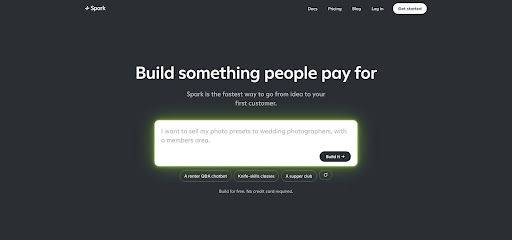
Spark (spark.site) works like a conversation: describe your idea, and Spark builds the website with hosting, customer accounts, and Stripe payments built in. You don't need to code.
What makes Spark different
You tell Spark what you want to sell and how much to charge. Its own documentation gives a lesson-style example: "Add a monthly membership for $20 that gives customers access to our full lesson library." Spark can sell subscriptions or one-time purchases through your site, connect the offer to members-only pages, and add extras such as a customer chatbot or live chat rooms. Fans sign in with email codes, and payments, refunds, and payouts run through your own Stripe account.
Before you open sales, a "Preview as" view lets you check what a visitor, a free customer, and a paying customer see, without making a purchase. After launch, Spark helps you plan and run marketing campaigns across channels.
Trade-offs to know
Spark is not a music toolkit. It has no ready-made audio player, tour calendar, ticketing, or EPK templates, so a musician-first platform will get you to a classic band site faster. Factor in the cost: you can build for free, but publishing and selling need the Starter plan at $25 a month plus a 10 percent fee on sales, separate from Stripe's processing fees. The Pro plan lowers the fee to 5 percent but costs $200 a month. Prices are set in US dollars, and Stripe is the only payment option.
2. Bandzoogle: Best All-In-One Home For Musician Subscriptions
Need one login for music player, EPK, store, mailing list, and paid tiers? Bandzoogle has hosted musicians' sites since 2003, so every menu speaks the language of tracks, gigs, and merch.

Why it stands out
Bandzoogle markets its fan subscriptions as commission-free: "You keep 100% of your subscription sales." Create unlimited tiers, put any content (blog posts, music player, videos, merch) behind them, and even let fans pay what they can. Payments go directly to your own Stripe or PayPal account.
Built-in musician toolkit
Music players, a tour calendar, an EPK, and a mailing list come with every website plan; merch sales start on Standard and ticket sales on Pro. That integration means perks such as "half-price vinyl" or a members-only demo stream are a setting away, not a Zapier flow.
Pricing snapshot
Lite costs $9.16 per month when billed annually ($11 month-to-month) and includes 10 pages, 10 tracks, basic subscriptions, and 100 mailing-list subscribers. Standard ($14.16 billed annually) adds merch and 1,000 mailing-list subscribers. Because Bandzoogle takes zero percent of subscription revenue, Lite becomes cheaper than a five percent fee model once you earn roughly $183 a month in memberships.
Watch-outs
Leaving the platform means rebuilding your site. Visual customization is narrower than Wix or Squarespace, and some subscription features are reserved for the Standard and Pro plans.
For artists who already sell music and nurture an active fan list, Bandzoogle offers a quick, low-tech route to recurring income.
3. Fourthwall: Best Place To Test Memberships With No Monthly Software Bill
Fourthwall lets you open a fan club for $0 upfront: "There are no monthly fees, no upfront costs, and no contracts." Fourthwall processes the payments itself (cards, PayPal, Apple Pay, Google Pay), keeps a 5 percent flat fee on memberships, and U.S. card processing adds 2.9 percent + 30¢.

Unsure how many fans will join? Fourthwall stays cheaper than a $29 flat-fee plan until membership revenue reaches about $580 a month; above that point, a fixed-price builder like Wix or Bandzoogle can cost less.
Tools you get
Video hosting, private livestreams, and polls
Members-only product drops and discounts
Discord roles based on membership tier
Subscriber analytics
Limitations to note
Commerce comes first, music second: no EPK or tour calendar, and the five percent fee scales with success. Re-run your spreadsheet when your fan club begins to grow.
If you already sell T-shirts, tabs, or presets and want to test a $5 tier without a new monthly bill, Fourthwall is the safest starting point.
4. Wix: Best For Design Freedom Plus Events And Crm In One Place
Why it stands out
Wix's Pricing Plans app lets you sell recurring plans that renew daily, weekly, monthly, or yearly, with no Wix commission on top of card processing.
That flexibility shines when your site sells concert tickets, one-off lessons, and a private fan club. Add paid plans to any page, then use Wix CRM to see who bought what and email superfans first, all inside one dashboard.
What it costs
Core, the first plan that accepts payments, is about $29 a month when billed annually (prices vary by location). U.S. card processing through Wix Payments is typically 2.9 percent + 30¢. A fixed $29 fee beats Fourthwall’s five percent cut once membership revenue passes about $580 a month.
Trade-offs
Setup can be involved: a typical musician site combines several Wix apps (such as Music, Events, and Pricing Plans) plus a payment method. Each module adds settings to configure. A finished Wix site also will not migrate intact, so weigh design freedom against a future rebuild.
If you need memberships and events, bookings, or advanced CRM automation, Wix puts them in one place; just budget extra setup time.
5. Squarespace: Best For A Polished Portfolio With Add-On Member Areas
Squarespace begins with design excellence: clean templates, strong typography, and gallery blocks. From there, you can add paid memberships, courses, and digital content, billed as recurring plans such as monthly passes.
Card processing through Squarespace Payments starts at 2.9 percent + 30¢ (2.7 percent on Plus and Advanced) and applies on top. Run the numbers before launch: the right plan depends on how much member revenue you expect.
Music workflow
Audio embeds, downloads, and events exist but feel secondary. You will map perks such as “early-bird ticket links” by combining Store, Events, and membership pages.
If polished visuals define your brand and you align plan choice with projected revenue, Squarespace delivers a smooth member experience that looks as good as it sounds.
Which option should you choose?

Yes. You want a site-wide player, an EPK tab, and an auto-updating gig calendar. Bandzoogle offers zero platform commission, quick setup, and musician-specific widgets.
Not sure yet. You want to test a $5 supporter tier without a new monthly bill. Fourthwall charges a five percent fee and no monthly bill, which stays cheaper than Bandzoogle Lite until memberships pass roughly $183 a month.
You also sell lessons, tickets, or services. Wix combines memberships with events, bookings, and CRM. Its $29 Core plan beats a five percent fee once memberships clear about $580 a month.
Visual design is top priority. Squarespace delivers the cleanest look, but watch its sliding membership fee. Move from seven percent to five percent (or lower) as soon as the math favors an upgrade.
You want something custom. Spark lets you describe a fan hub in chat, including members-only pages, a customer chatbot, or live chat rooms, for a $25 base price plus a 10 percent fee on sales.
Before You Hit “Launch” On A Paid Fan Club
A slick sign-up page is useless if the customer journey breaks mid-flow. Run this pre-flight checklist first.
1. Offer one repeatable benefit.
Fans pay for next month, not last month’s surprise. Commit to a cadence you can keep: an unreleased demo every first Friday, a behind-the-scenes livestream each third Thursday, or early ticket links 48 hours before public on-sale.
2. Limit yourself to two tiers.
A $5 "supporter" and a premium "superfan" tier cover most needs. Add more only after you know your true delivery cost.
3. Test the full mobile flow.
Complete the loop on your phone: sign-up → pay → confirmation email → log-in → cancel → trigger a failed payment. Most fans will do the same.
4. Export and back up your member CSV.
Verify you can pull email, join date, tier, and payment status anytime. Store the file in a secure location; it’s your life raft if you migrate.
5. Confirm tax responsibility.
Is the platform the merchant of record? Some collect and remit VAT; others leave that to you. Check before the first euro or pound hits your account.
6. Publish clear refund and cancellation terms.
State grace periods, prorated refunds, and what happens to gated content after cancellation. Clarity cuts support tickets.
A smooth checkout earns trust, and a painless exit earns the chance to win that fan back. Nail both, and your membership becomes a reliable revenue lane instead of a short-lived stunt.